01
Ask at the right moment
Share a direct review link through your configured post-visit email or WhatsApp workflow.
Bring patient enquiries, appointments, reports and billing into one workspace. Keep your care team connected, from the first appointment to the next follow-up.


Family care · Clinic preview

A welcoming clinic and a team that took the time to explain every step.
The follow-up was thoughtful, and I knew what to expect at my next visit.
Share a direct review link through your configured post-visit email or WhatsApp workflow.
View Google reviews, filter unanswered feedback and publish thoughtful public replies from your CRM.
Create a consistent follow-up process that invites honest patient experiences after a visit.

Link appointments to patients and providers, with a clear date and visit status.
Keep assigned tasks and follow-up work visible alongside appointments.
Include accessible module Date fields and filter the schedule around your work.
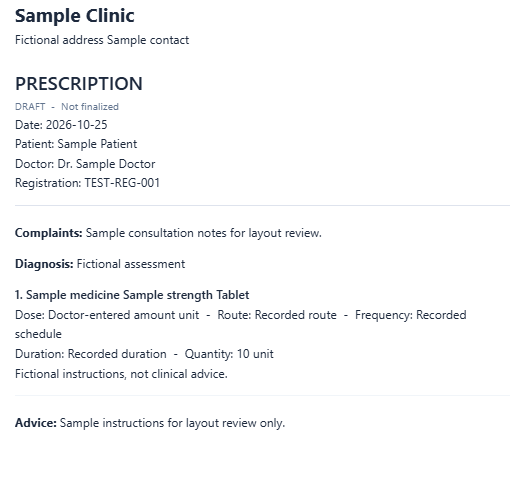
Choose the patient and linked provider, then record consultation notes and medicine directions in the dedicated prescription writer. Drafts save as you work.
Check the live layout with your clinic letterhead and open the print proof to review the generated PDF. Choose digital stationery or a version for preprinted paper.
Review the prescription and finalize through the account linked to the selected prescriber. Keep the finalized document and create a linked amendment when a change is needed.
Create ward and room modules around the way your facility works. Define the fields your team needs, then connect room assignments to patient records for a shared operational view.
Your facility's workflow, organized in your CRM.
Explore wards & roomsCustom modules · Related patients · Status filters
Illustrative configuration using the module builder.
From booking a visit to going home, keep the next step clear.
Link the patient, doctor and appointment date.
Keep prescriptions, reports and care plans connected.
Connect a configured admission to a room and bed.
Record discharge, review billing and book a follow-up.
Keep diagnostic files alongside patient records, with the report type, date and result summary. Make it easier for authorized team members to find the supporting documents they need.
Less scattered paperwork. Better continuity between teams.
Explore diagnostic reportsIllustrative report records. No real patient information.
Medicines, batches and stock movements. A clearer view for every part of your care team.
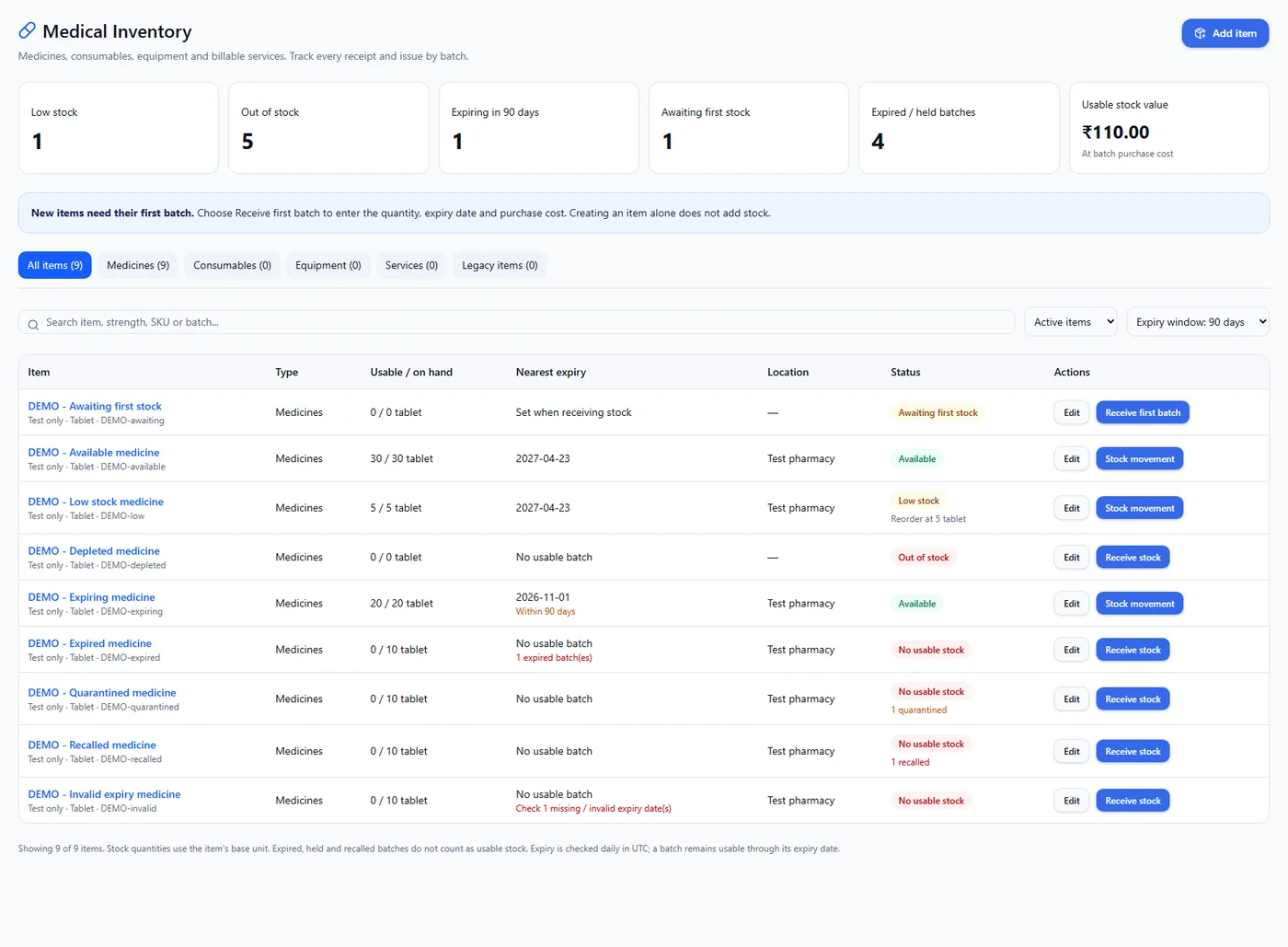
See available, low-stock and out-of-stock items.
Keep quantities, purchase costs and expiry dates together.
Record authorized dispensing from finalized prescriptions.
Actual desktop interface with illustrative device layouts · Fictional demonstration data
SAMPLE INVOICE · DEMO-001
Patient, invoice and payment details. Together.
Scan the QR in your payment app
Illustrative payment journey. Payment links, QR availability and messaging depend on your configured payment provider and connected channels.
Choose the content, personalize the message and build a workflow around the people you want to reach.
Hi Priya, here is the guide for your appointment tomorrow at 10:30 AM.
BEFORE YOUR APPOINTMENT
01 / What to bringPlease bring your previous reports. See you tomorrow!
10:306 custom fields
New patient records appear here
Same patient records. Switch between table and pipeline.
Bring your people into one workspace. Organize departments, assign roles and configure what each team member can view, create or edit.
Patient visits & clinical records
Give each team member an individual account.
Connect reception, clinical care, diagnostics and billing.
Configure module access around each responsibility.
Illustrative team and permission configuration.
Bring the numbers that matter into one clear view. Choose metrics, charts and totals from your configured modules, then arrange them around the decisions your team makes.
Daily overview
A clearer picture of progress
Metrics, totals and charts from your configured fields.
Arrange widget sizes and layouts around your daily work.
Create views around reception, care and billing priorities.
Create forms around the details your clinic needs. Connect enquiries and service requests to your configured CRM modules.
Choose a form, arrange the fields and give your team the information they need to follow up.
Form submission → CRM record → Team follow-up
Capture enquiries, connect existing data and keep your website in step with the team. Configure the connections that fit your workflow.
Bring Facebook and Instagram lead-form enquiries into a configured CRM workflow. Connect your Meta page and form, then map incoming fields for your reception team.
Connect Google lead-form webhooks to capture campaign enquiries in your CRM. Configure your connection and field mappings so your team has the details needed for the first conversation.
Explore external MongoDB collections and map data into CRM modules. Choose the source database and collection, review fields and configure the connection around your existing records.
Choose CRM modules for JSON backups or Excel exports, then configure a schedule and active admin recipients. Keep emailed copies of business records for your team's reference.
Build patient-facing lookup pages using approved CRM fields. Configure selected modules, allowed domains and access rules for appointment, report or invoice status enquiries.
Explore guides and articles for your industry.
New healthcare articles will appear here when published. Explore all CRM guides
Practical answers before you choose your workspace.
Explore pricingHealthcare CRM software helps care teams organize patient relationships and operational work. Bizrow connects patient records, appointments, care plans, prescriptions, diagnostic files and billing in a configurable workspace for clinics, hospitals and diagnostic centers.
Yes. The dedicated prescription writer supports structured medicine rows, consultation notes, draft saving, live preview and printable PDFs. Configure provider mappings and clinic letterhead during setup. Finalization requires the account linked to the selected prescriber.
Authorized staff can dispense from a current finalized prescription and record the issued quantities and batches. Creating or printing a prescription does not change stock. Dispensing access and inventory setup must be configured for your workspace.
Ward and room tracking can be configured with the module builder. Define your room, bed, availability and assignment fields, then connect the records to patients. Discuss the operational workflow you need during your demo.
With a connected Google Business Profile and the required permissions, your team can view reviews, filter unanswered reviews and publish public replies. Review requests and communication channels require setup. Requests are not automatically matched to individual Google reviewers.
Yes, after the relevant integrations, senders, templates and automation rules are configured. Your team chooses the triggers and conditions. WhatsApp template approval and channel requirements apply where relevant.
Administrators can configure role and user permissions for modules and records. Review the data, access, retention and healthcare requirements of your organization during setup. A demo can help you assess the permissions your care team needs.
Yes. Book a demo to review patient workflows, prescriptions, inventory, integrations and configuration with your team. You can also compare the current plans on the pricing page.
Tell us about your business and the way your team works. We'll walk you through a CRM setup for your industry.