Customers
Keep every customer in view. Connect contact details, installed products, service requests and feedback.
Connect service requests, technician jobs, spare parts and customer history. Keep every repair moving, with warranty and AMC follow-ups in the same workspace.

Keep every customer in view. Connect contact details, installed products, service requests and feedback.
Know the product behind every visit. Track serial numbers, installation dates, warranty expiry and service plans.
Give every issue a next step. Connect customers, products, priorities, due dates and assigned team members.
Keep customer complaints organized. Record issues, assign your team and track progress through to resolution.
Keep the right parts in view. Organize SKUs, stock quantities, unit prices and availability in one place.
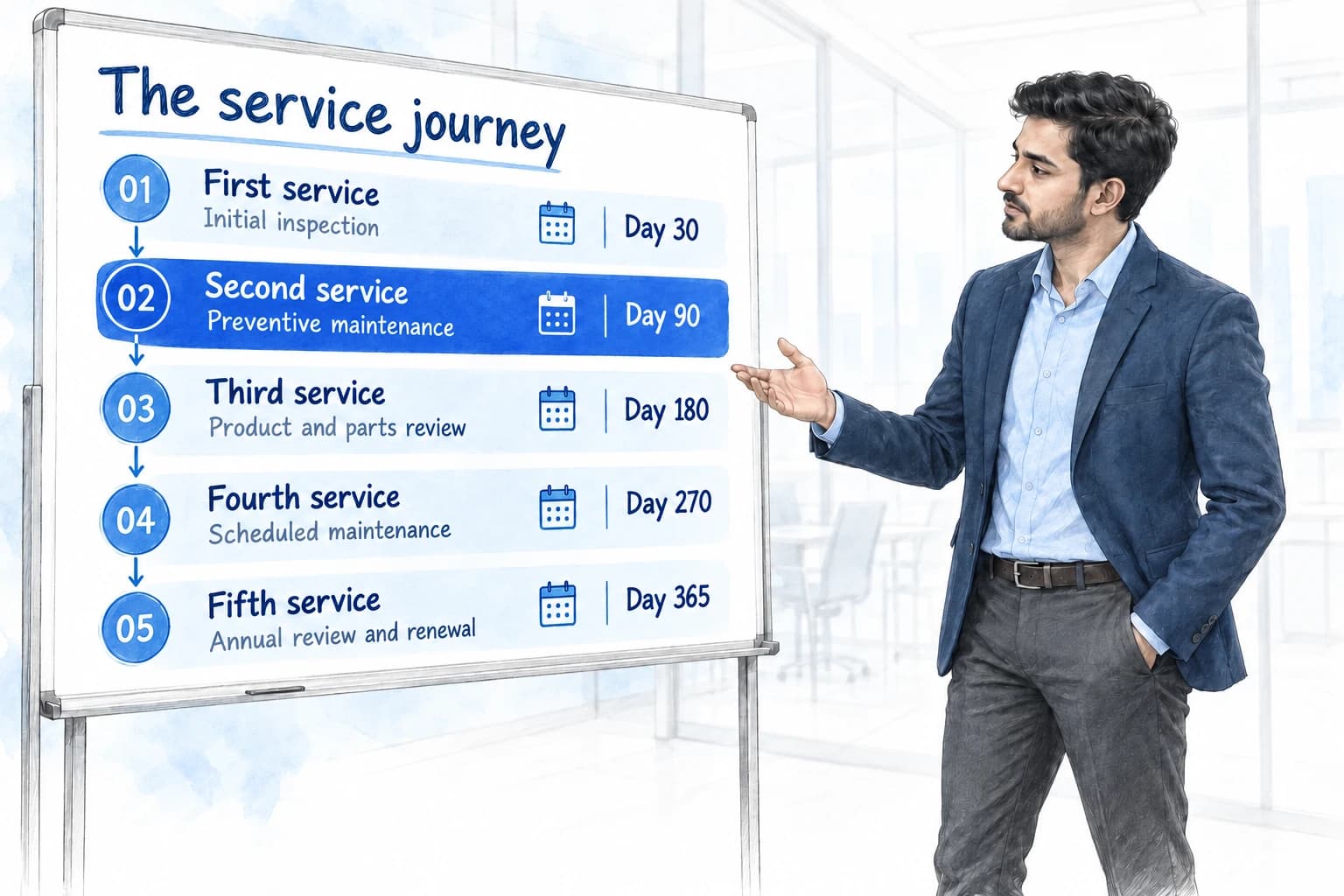
Plan the next visit. Configure installation checks, warranty follow-ups, maintenance intervals and renewal schedules.
Make it easy for customers to reach you. Collect enquiries and service requests through forms connected to your CRM.
Bring clarity to billing. Keep service charges, invoices and payment tracking alongside your service operations.
Keep customers informed. Configure visit updates, service reminders and renewal follow-ups through connected workflows.
Build around your business. Add custom fields, relationships, forms and files as your service operations grow.
See the workload clearly. Build charts, totals and filtered views around service demand, priorities and progress.

Manage a growing customer base quickly and easily. Keep customer details, products and service history together, find the right record fast, and give your team a clear view of every customer.
One place for every product you install. Connect customers, serial numbers and warranty details so your team can deliver informed service, every time.

Hi Arjun, your air conditioner is due for its next service. Contact our team to arrange a convenient visit.
Example schedule. Service names and intervals are customizable.

Capture the issue while you listen. Keep complaint details, ownership and past conversations together, so your team can follow up with context.
Illustrative complaint record with sample notes and activity.
Record the detailsKeep issue notes with the customer and product.
Track the progressFollow ownership, status and record history.
Keep following upPlan the next action until the issue is resolved.
Organize spare parts in one workspace. Find the right SKU, check stock levels and keep prices and availability clear for your service team.

| Part name | SKU | Stock on hand | Availability |
|---|---|---|---|
| Air filter cartridge | FLT-240 | 24 units | Available |
| Fan motor assembly | MTR-110 | 3 units | Low stock |
| Control board | PCB-008 | 0 units | Out of stock |
Illustrative inventory with sample quantities and statuses. Configure stock fields and workflows for your business.
Keep warranty expiry and maintenance plans connected to the installed product. Give every follow-up a place, from the first check to the next AMC renewal.
Arjun Mehta / Serial AC240-00842
Stay connected from the first installation check to the renewal conversation.
Example intervals from the record's anchor date. Customize labels and timing for your business. Messaging requires configured integrations and workflows.
SAMPLE INVOICE · DEMO-001
Customer, invoice and payment details. Together.
Scan the QR in your payment app
Illustrative payment journey. Payment links, QR availability and messaging depend on your configured payment provider and connected channels.
Choose the content, personalize the message and build a workflow around the people you want to reach.
Hi Priya, here is the guide for your service visit tomorrow at 10:30 AM.
BEFORE YOUR SERVICE VISIT
01 / Your product detailsPlease keep your product details ready. See you tomorrow!
10:306 custom fields
New customer records appear here
Same customer records. Switch between table and pipeline.
Bring the numbers that matter into one clear view. Choose metrics, charts and totals from your configured modules, then arrange them around the decisions your team makes.
Daily overview
A clearer picture of progress
Metrics, totals and charts from your configured fields.
Arrange widget sizes and layouts around your daily work.
Create views around support, technicians and billing priorities.
Explore guides and articles for your industry.
New product service articles will appear here when published. Explore all CRM guides
Practical answers before you choose your workspace.
Explore pricingProduct service CRM connects customer records with installed products, service requests, technician work orders, parts, and feedback. Bizrow adds configurable service plans, dashboards, permissions, and communication workflows to support your after-sales operations.
Yes. Installed products include warranty expiry and a service-plan selection. Start with Installation & Warranty or AMC Service templates, then edit the interval labels and days to match your business. Assigning a plan to a supported record generates dated service records.
Each service interval has a number of days after a record's anchor date. Bizrow uses a suitable date field, such as purchase, start, or installation date, and falls back to record creation when no suitable date is available. Confirm the date fields in your workspace during setup.
Work orders include a linked service request, scheduled date, technician, work performed, charge, and status. The starter Technician role has access to installed products, service requests, work orders, and spare parts, with permissions that your administrator can configure.
You can configure WhatsApp and email workflows for service updates, visit follow-ups, and renewals. Communication requires the relevant integration, templates, and automation setup. Creating a service plan schedules records; it does not automatically activate messaging.
Yes. Bizrow supports custom fields, related records, module configuration, imports and exports, filters, and dashboard widgets. You can adapt the starter service workspace to your products and team rather than use a fixed process.
The product catalogue supports products, spare parts, and services with SKUs, brands, models, stock levels, minimum stock, and purchase and selling prices. Invoices and payments are available in the wider platform. Configure these alongside your service workflow during setup.
Tell us about your business and the way your team works. We'll walk you through a CRM setup for your industry.